

 Português
 Español
How many projects do you have running at the same time? Five, ten, twenty? Now think about this: how much time do you spend checking line by line until you find the one that’s at risk?
That’s the reality for anyone managing several strategic initiatives at once. With so much in progress, what truly needs attention can easily get lost among everything that is already going well. And when that happens, management becomes reactive instead of proactive.
With that in mind, PAA now has a simple and direct new feature: you can filter projects by the color of their schedule status, directly on the My Projects screen.
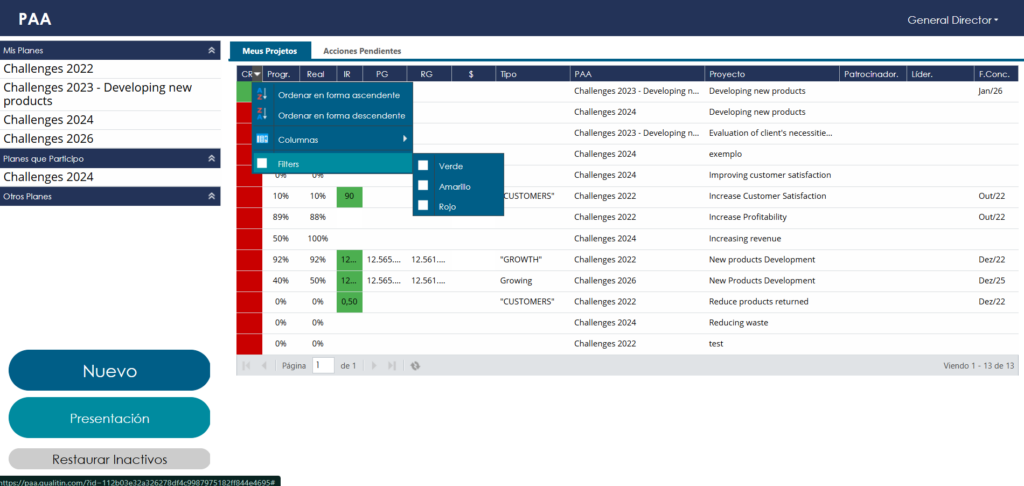
What changes in practice
Before, you could sort projects by status color, but not filter them. In other words, you still had to scan the entire list to separate what was on track from what was overdue.
Now, you don’t. With one click, you can isolate only what matters: for example, only the projects with an overdue schedule, shown in red. The rest of the list disappears from the screen — and from your attention.
Why this matters
Focus on what matters. You stop spending energy looking at what is already under control and direct your attention to what actually requires a decision.
More objective follow-up. Less time digging for information, more time acting on it.
More organization, with no extra effort. The screen already gives you exactly the view you need, without parallel spreadsheets or manual notes.
In the end, this is what separates reactive project management from strategic management: quickly knowing where to act first.
Not using PAA yet?
This type of visibility — having clarity on which projects require immediate attention — is exactly what PAA delivers to those leading multiple strategic initiatives at the same time. It exists to turn planning into execution that can be properly tracked, with deadlines, owners, and progress visible in one place.
If your project follow-up routine still depends on memory, scattered spreadsheets, or meetings just to find out what is overdue, it’s worth taking a closer look at PAA.
Talk to the Customer Success team and discover how to apply this filter — and PAA as a whole — to your management routine.