

 Português
 Español
Anyone who uses the Virtual Table knows the value of bringing the right indicators together in a single dashboard. Until now, however, sharing that dashboard with your team involved a frustrating process: adding users one at a time.
If you needed to give access to ten people, that meant ten separate actions, without a clear view of who had already received access and who was still missing.
That has changed.
What’s changed
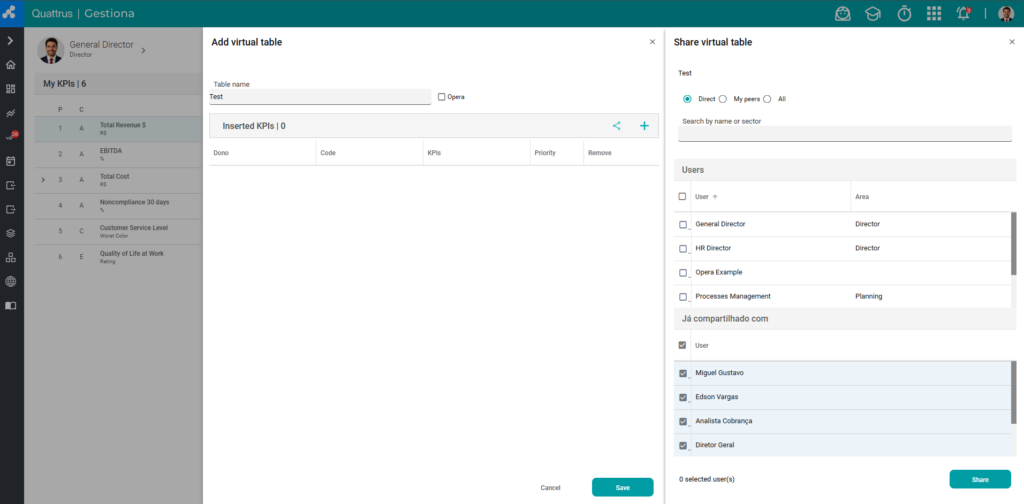
Now, when sharing a Virtual Table—whether with Direct Reports, My Peers, or Everyone—you can select multiple users at once on the same screen.
Two additional improvements make the process even faster:
- Real-time filter by Name or Department: simply start typing, and the list filters automatically—no need to press Enter.
- “Already shared with” field: instantly see who already has access to the table, without having to guess or check later.
What you gain
- A truly faster sharing process: what used to require repetitive actions can now be completed in a single flow.
- A clear view of who already has access, preventing duplicate shares or missed users.
- Greater control over who is actually monitoring the results in that table.
Ultimately, it means less time managing access and more time ensuring that the right people are looking at the right indicators.
Try it now!