

 Português
 Español
At Quattrus, we’re always attentive to our clients’ needs and constantly strive to enhance the user experience of our solutions. In this article, we present two important updates to Gestiona that will make your daily routine more organized, agile, and efficient.
We’ve implemented improvements that make it easier to compare indicators and identify reports exported from the system.
Multi-Chart with Custom Names and Simplified Navigation
The Multi-Chart feature is widely used by our clients to compare and display up to four charts simultaneously, making indicator analysis clearer and more visual. However, we received valuable feedback from clients who created dozens of tabs within the feature—some reaching up to 80!—and found it difficult to identify and navigate between them.
So, we introduced two key improvements:
- Tab name editing: You can now name each tab in the Multi-Chart. Instead of generic numbers, you can assign clear names like “Sales Indicators” or “Performance by Region”.
- Dropdown navigation menu: We’ve added a dropdown list showing all tabs. This makes it easy to quickly find the chart you need—even if it’s in tab 35, for example.
Practical benefits:
- More customization: Name your tabs based on the content.
- Faster access: Navigate easily, even within complex structures.
- Improved organization: Smoother meetings and presentations.
Exported Reports with Identifiable Names
We know how challenging it can be to locate the right file among many exported reports. Until now, files generated by Gestiona came with a generic numeric name, which made identification difficult—especially when saving multiple reports at once.
To solve this, exported files will now include the report’s name in the title, followed by a sequential numeric code.
New format:
REPORT NAME + SEQUENTIAL NUMERIC CODE
This change applies both to the user and administrator environments.
Benefits:
- Clarity: Quickly identify which report is which.
- Speed: Find the right file effortlessly.
- Organization: Easier folder and document management on your computer.
Small Improvements, Big Impact
These two updates were designed with practicality, organization, and efficiency in mind. We understand that in the fast-paced world of management, every second—and every click—counts.
With a smarter Multi-Chart and clearly named reports, Gestiona becomes even more aligned with managers’ real-world needs, helping to speed up analyses, make meetings more objective, and support more informed decision-making.
Stay tuned to our News section and keep up with the ongoing evolution of our platform. And of course, count on us to take your management to the next level.
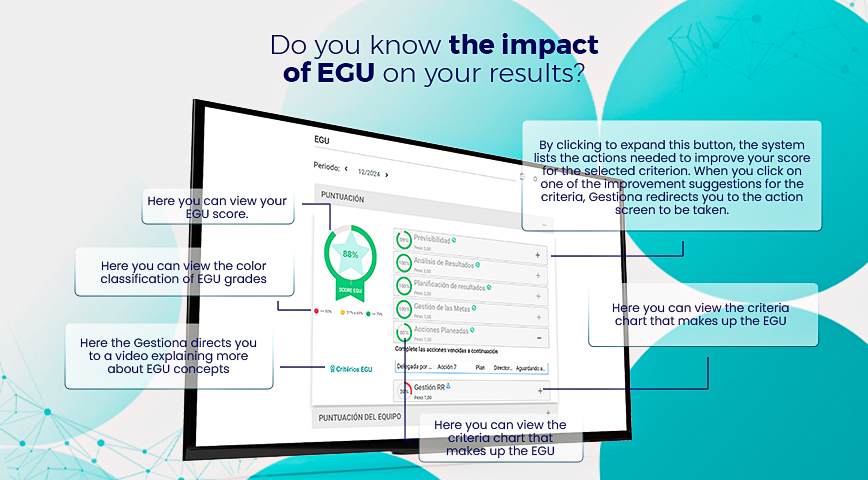
HOW TO IMPROVE YOUR EGU SCORE?
If your EGU score is lower than expected, don’t worry! The system itself helps you improve. Here are some actions you can take:
✅ Regularly analyze your indicators and input data correctly.
✅ Follow the improvement suggestions provided within EGU.
✅ Engage your team in using management tools.
✅ Use the “Improve EGU” feature for targeted actions.
Now that you know the impact of EGU on your efforts, make the most of all available resources and take your goals to the next level!